
DRIFFFYNS R&D · Engine study · November 2026
Building Fyn Engine
How a small C++ game engine draws grass, water, shadows and bloom — and runs the same game in an editor, a Windows exe and a web page.
Abstract
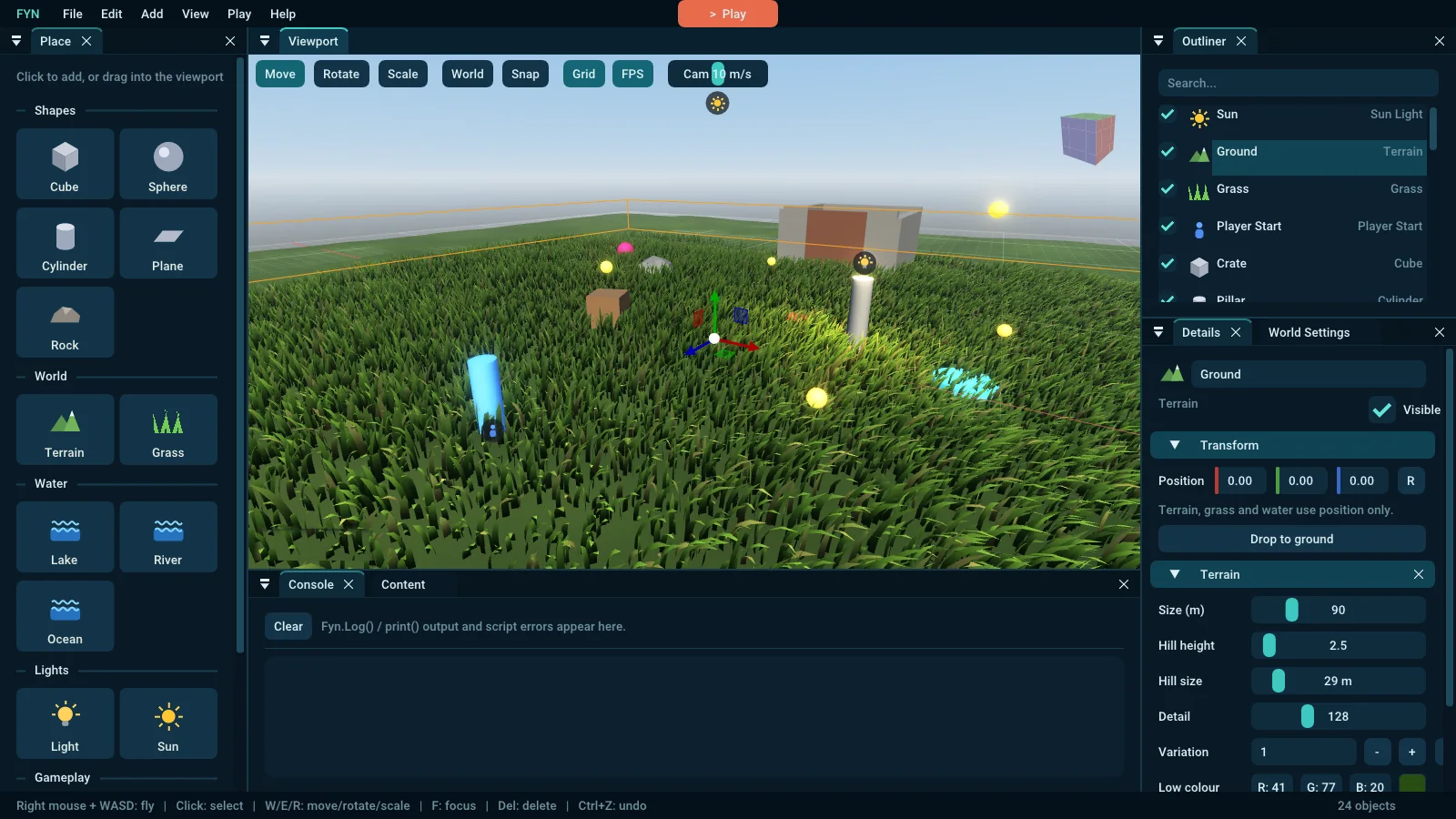
Fyn Engine is our own lightweight game engine: about 13,000 lines of C++20 and GLSL, an OpenGL 4.1 renderer, a visual editor, Lua scripting and a WebAssembly player. This study walks through how one frame is made — sun shadow map, HDR scene with 4× MSAA, a five-level bloom chain and a soft tone map — and through the three systems that give the engine its look: GPU-instanced grass with chunked LOD, spline water with Gerstner waves and flow-mapped rivers, and a Cook-Torrance PBR shader that needs no tangents. We also describe a real bug from v0.8 in which a single invalid pixel turned the whole screen white, and what it taught us about post-processing. Every code excerpt is taken unchanged from the engine source; in the web version the figures are live.
Contents
- Why our own engine
- Architecture: one world, three players
- Anatomy of a frame
- Lighting: PBR without tangents
- Sun shadows
- HDR, bloom and tone mapping
- Case study: the white flash
- Fifty thousand blades of grass
- Water: lakes, rivers, oceans
- Scripting and sound
- The web port
- Results, limits and what's next
1. Why our own engine
We make games in Unreal Engine and in the browser with three.js. Both are excellent, but neither gives us a tool we fully understand from the window to the pixel. Fyn started as a learning project with four hard rules:
- One file to run. The editor is a single
FynEngine.exe(5.4 MB) — shaders, font and icon are embedded. No installer. - A real editor, not a code framework. You build levels with the mouse, give objects behaviour with small Lua scripts, and press Play.
- The same game everywhere. What you see in the editor is what the exported Windows game and the browser build show.
- Small enough to read. No dependency we could not explain. The renderer is plain OpenGL; the third-party code is GLFW, GLM, Dear ImGui, ImGuizmo, Lua, ufbx, stb, nlohmann/json and miniaudio.
The engine grew in eight steps in a few weeks: renderers and instanced grass (v0.1), a one-exe app shell (v0.2), the editor (v0.3), Lua scripting (v0.4), water, model import and web export (v0.5), sun shadows (v0.6), HDR and bloom (v0.7), PBR materials and audio (v0.8) and the v0.8.1 patch described in section 7.
2. Architecture: one world, three players
The code is split into an engine library (window, input, renderers, grass, water, post-processing, audio), the editor application, and a small web entry point. The key design decision is that a level is a single data structure, the World, and that a single class, WorldRenderer, draws it. Three different programs host that pair:
game.fyn next to it. No editor UI.Because all three call the same WorldRenderer, a fix to the grass or the bloom reaches every target at once — and a bug does too, as section 7 shows.
Entities as a struct of optionals
Fyn does not use a full entity-component system. An Entity is a plain struct with a transform and a handful of optional components: MeshComp (shape or imported model, colour, glow, roughness, metallic, normal map, cast shadows), LightComp, TerrainComp, GrassComp, WaterComp, BehaviourComp (spin, bob, collectible) and a script with per-object property overrides. A level rarely has more than a few hundred entities, so iterating a std::vector<Entity> each frame is cheaper than any indirection, and the whole level saves to a readable JSON .fyn file.
Heavy derived data — the terrain mesh, the grass instance buffer, the water mesh — is cached on the entity and rebuilt only when a hash of its settings changes. Water is included in the terrain's hash, because water carves the ground (section 9).
The application loop
Application owns the window and the current scene and exposes a single Frame() function. On the desktop, Run() simply calls it in a loop; in the browser the same function is handed to emscripten_set_main_loop_arg, because a web page may not block. Nothing else in the engine needed to know which platform it runs on.
3. Anatomy of a frame
A frame of a typical Fyn level goes through seven stages. Figure 2 shows them in order; the coloured stage is the one that caused the bug in section 7.
WorldRenderer. Editor lines and gizmos are drawn into the HDR target too, so they get anti-aliased and tone-mapped like the scene.The HDR target is created with graceful fallbacks: if a GPU refuses a multisampled float buffer, Fyn tries float without MSAA, then 8-bit. The editor never shows a black viewport because of a missing format — it logs which path it took (for example PostFX: 960x539 HDR buffers in the browser).
4. Lighting: PBR without tangents
Since v0.8 every mesh is shaded by one fragment shader, lit.frag, using the Cook-Torrance microfacet model with the GGX distribution, Smith-Schlick geometry term and Schlick's Fresnel approximation — the same family of terms used by Unreal Engine 4 [1, 2, 3].
D = α² / (π ((n·h)²(α² − 1) + 1)²), α = roughness², k = (roughness + 1)² / 8
vec3 BRDF(vec3 N, vec3 V, vec3 L, vec3 diffuseColor, vec3 F0, float rough)
{
    float NdotL = max(dot(N, L), 0.0);
    if (NdotL <= 0.0) return vec3(0.0);
    vec3 H = normalize(V + L);
    float NdotV = max(dot(N, V), 1e-4);
    float NdotH = max(dot(N, H), 0.0);
    float VdotH = max(dot(V, H), 0.0);
    float a = rough * rough;
    float a2 = a * a;
    float d = NdotH * NdotH * (a2 - 1.0) + 1.0;
    float D = a2 / (PI * d * d);
    float k = (rough + 1.0) * (rough + 1.0) / 8.0;
    float G = (NdotV / (NdotV * (1.0 - k) + k)) * (NdotL / (NdotL * (1.0 - k) + k));
    vec3 F = F0 + (1.0 - F0) * pow(clamp(1.0 - VdotH, 0.0, 1.0), 5.0);
    vec3 spec = D * G * F / (4.0 * NdotV * NdotL + 1e-4);
    return ((1.0 - F) * diffuseColor + spec * PI) * NdotL;
}
One deliberate deviation: the diffuse term is not divided by π. Fyn's scenes and sun intensities were tuned before PBR existed; keeping diffuse at the old scale meant every v0.7 level looked identical after the upgrade, and the specular term is multiplied by π instead to stay in proportion. Metals follow the usual metallic workflow: F0 = mix(0.04, albedo, metallic) and the diffuse colour fades to black.
Ambient light without a cube map
Fyn has no environment maps. Ambient diffuse light is a hemisphere blend between the ground and sky colours along the normal, and ambient specular reflects a procedural sky — horizon colour at the horizon, sky colour above, ground below — blurred towards an average as roughness rises. It costs a few instructions and makes metal objects pick up the time of day from World Settings.
Normal maps without stored tangents
Imported OBJ and FBX files do not always carry tangents, and generating them would have meant another pre-processing step. Instead, lit.frag rebuilds the tangent frame per pixel from the screen-space derivatives of position and UV, following Schüler's method [4]:
vec3 PerturbNormal(vec3 N, vec3 p, vec2 uv)
{
    vec3 mapN = texture(u_NormalMap, uv).xyz * 2.0 - 1.0;
    mapN.xy *= u_NormalStrength;
    vec3 dp1 = dFdx(p), dp2 = dFdy(p);
    vec2 duv1 = dFdx(uv), duv2 = dFdy(uv);
    vec3 dp2perp = cross(dp2, N), dp1perp = cross(N, dp1);
    vec3 T = dp2perp * duv1.x + dp1perp * duv2.x;
    vec3 B = dp2perp * duv1.y + dp1perp * duv2.y;
    float invmax = inversesqrt(max(max(dot(T, T), dot(B, B)), 1e-12));
    return normalize(mat3(T * invmax, B * invmax, N) * mapN);
}
The max(…, 1e-12) matters: on a pixel where UVs do not change (a flat-coloured model), T and B are zero and an unguarded inversesqrt would return infinity. Guards like this one became the whole story of section 7.
5. Sun shadows
Shadows (v0.6) use a single orthographic shadow map that follows the camera and covers the area around the player (about 45 m). The map size follows the Graphics Quality setting: 1024, 2048 or 4096 texels. Two details make it stable and soft.
Texel snapping. If the shadow camera moves with the player by fractions of a texel, every shadow edge crawls. BeginShadowPass snaps the centre to whole texels in light space:
// Snap the centre to whole texels so shadows don't shimmer when the camera moves
const float texel = (2.0f * radius) / float(s->shadowSize);
glm::vec4 c = view * glm::vec4(focus, 1.0f);
const glm::vec2 snap = glm::vec2(std::floor(c.x / texel), std::floor(c.y / texel)) * texel - glm::vec2(c.x, c.y);
view = glm::translate(glm::mat4(1.0f), glm::vec3(snap, 0.0f)) * view;
Filtering and fade. The depth texture is sampled as a sampler2DShadow with hardware comparison, nine times in a 3×3 pattern (percentage-closer filtering). A normal offset of 6 cm and a polygon offset in the depth pass remove acne, both faces of every caster are drawn to reduce light leaking through thin objects, and the shadow fades out over the last 8% of the map so its edge is never visible. Each object has a Cast shadows checkbox.
6. HDR, bloom and tone mapping
From v0.7 the scene is rendered into a 16-bit float target, so a glowing coin or the sun's reflection on water can be ten times brighter than white. The bloom is a mip chain in the style of Jimenez [5]: a bright pass extracts what is above a threshold (with a soft knee so the cut is invisible) while downsampling, four more box-filtered downsamples follow, and five 9-tap tent upsamples add each level back onto the next larger one. The result is a wide, smooth glow for the price of ten small full-screen passes.
The tone map is our own, chosen for one reason: existing scenes had to look the same. Everything below 0.75 passes through unchanged; above it, values are compressed exponentially towards 1 instead of clipping:
vec3 ToneMap(vec3 x)
{
    const float k = 0.75;
    vec3 over = max(x - k, 0.0);
    vec3 soft = k + (1.0 - k) * (1.0 - exp(-over / (1.0 - k)));
    return mix(x, soft, step(k, x));
}post.frag.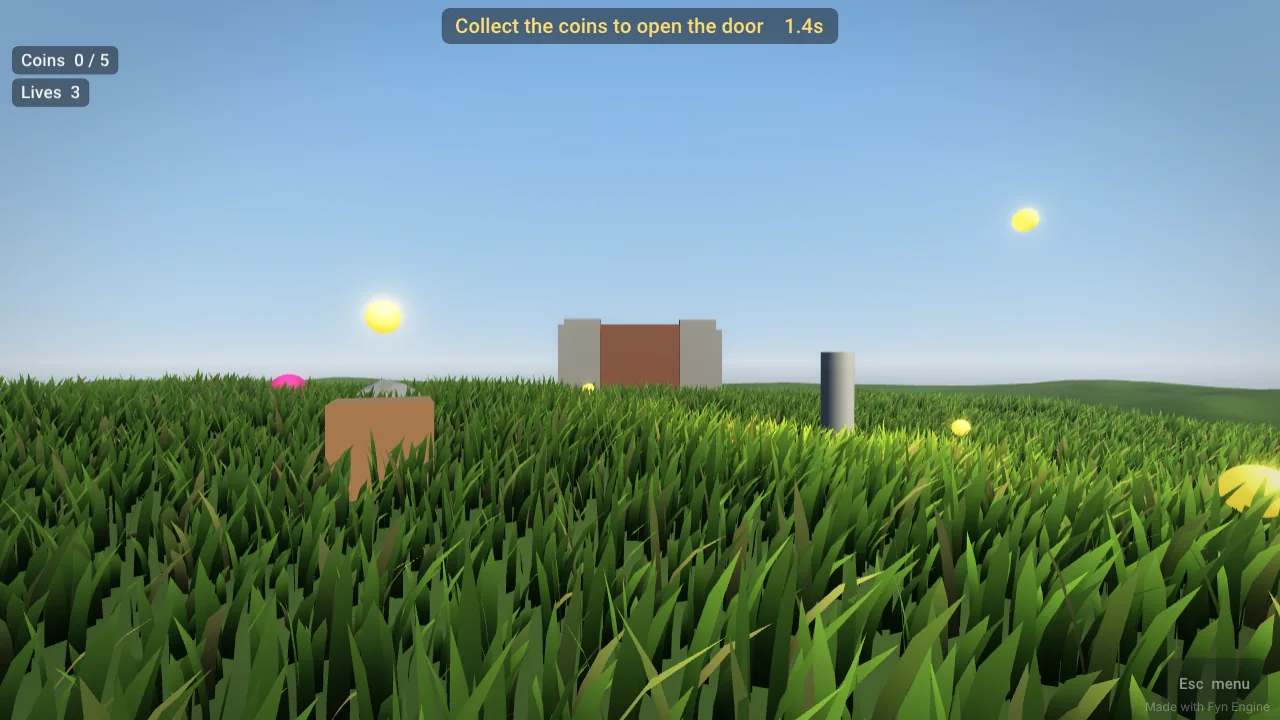
7. Case study: the white flash
After v0.8 shipped, the scene could wash out to pure white on some Windows GPUs, with black specks scattered across it. It did not happen on every machine, which made it hard to see during development.
The cause was not the bloom — but the bloom made it visible. A handful of shader expressions could produce an invalid floating-point value (NaN) on some drivers: pow() of a number a hair below zero, which is undefined in GLSL, and normalize() of a zero-length normal on degenerate triangles. A NaN pixel is drawn as black — the specks. That alone would be a tiny glitch. But NaN is contagious: any average that includes it is NaN. The bloom's first box filter turns one bad pixel into a 2×2 block, each smaller mip spreads it further, and by the 1/32-size level the whole bloom texture is invalid. The composite then adds it to every pixel on screen, and the driver clamps the result to white.
The v0.8.1 fix works at both ends. At the source, the shaders clamp the arguments of pow() and fall back to an up-facing normal when the interpolated one has zero length:
vec3 n = dot(v_Normal, v_Normal) > 1e-10 ? normalize(v_Normal) : vec3(0.0, 1.0, 0.0);And as a firewall, every texture read in the bloom and composite passes goes through Clean(), which turns NaN and infinity into black and caps very bright values:
// A single bad pixel (NaN / infinity from any shader) must never reach the
// bloom: blurred, it would wash the whole screen out to white.
vec3 Clean(vec3 c)
{
    if (any(isnan(c)) || any(isinf(c))) return vec3(0.0);
    return clamp(c, vec3(0.0), vec3(1000.0));
}8. Fifty thousand blades of grass
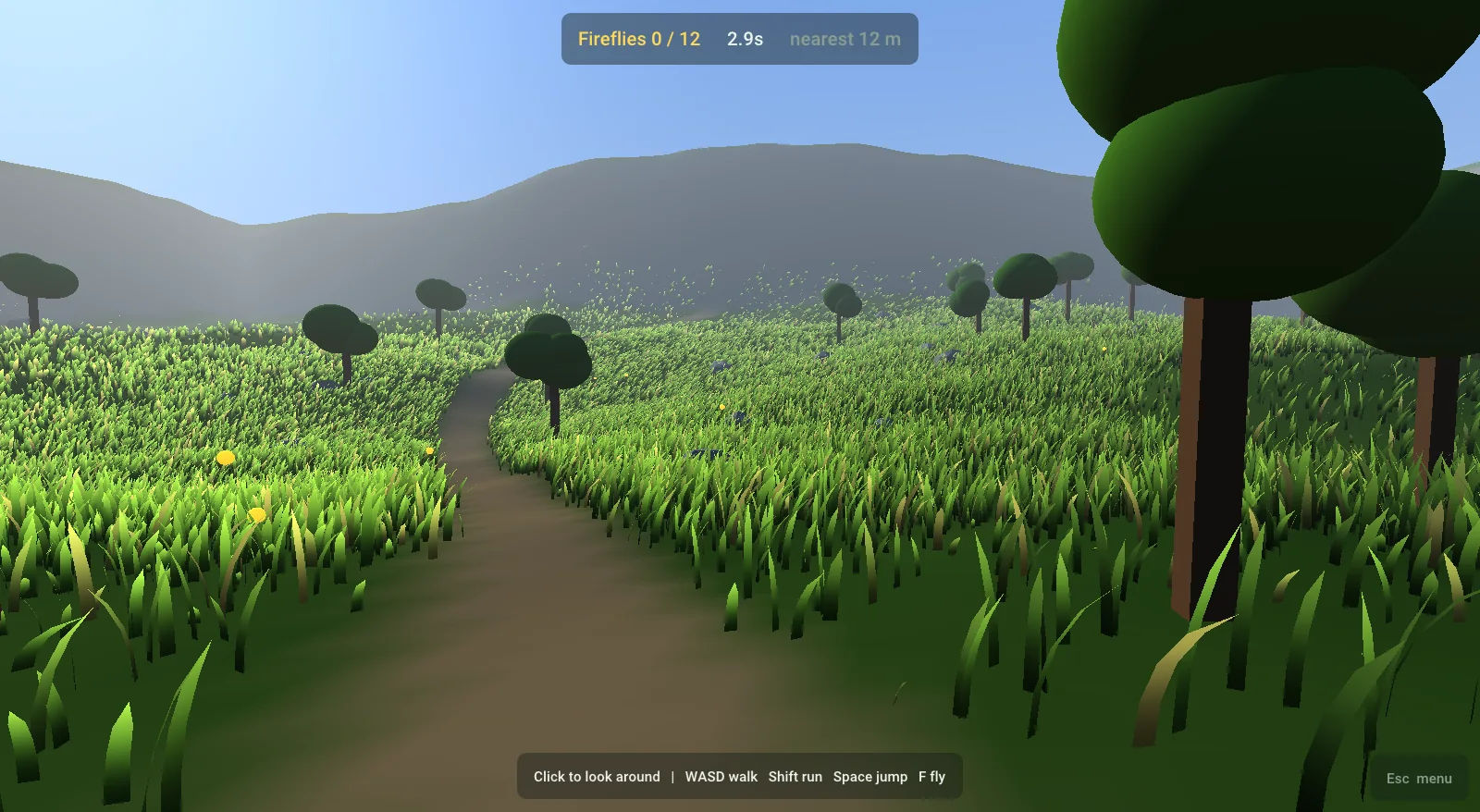
Grass was the first feature of the engine and is still its signature. Each blade is one instance of a tiny mesh: nine vertices in four segments narrowing to a tip, where each vertex stores only (side, t) — left or right edge, and height from root (0) to tip (1). Everything else is per instance, 32 bytes:
struct Instance
{
    glm::vec4 posRot;   // xyz = root position, w = facing angle
    glm::vec4 params;   // x = height scale, y = width scale, z = lod rank [0,1), w = variation
};
Chunks and LOD by "drawing the first N"
Blades are scattered in 8 m chunks over the terrain (using the terrain's height function and a mask, which is how water and paths remove grass). Each blade gets a random LOD rank in [0, 1), and — the important trick — the blades of each chunk are sorted by that rank before upload. Thinning the grass with distance then needs no per-blade work on the CPU: for a chunk at distance d we simply draw the first N instances, where N = count × keepFraction(d). The vertex shader computes the same fraction and shrinks blades whose rank is just above the cut to zero height, so they fade instead of popping:
// Fraction of blades kept at a given distance. MUST match grass.vert.
float KeepFraction(float dist, const GrassSettings& s)
{
    return 1.0f - noise::Smoothstep(s.lodStart, s.lodEnd, dist) * 0.9f;
}
Far blades are drawn up to 3.5× wider, so the field keeps its colour coverage with a tenth of the blades. Chunks are frustum-culled against their bounding boxes, and each visible chunk is one glDrawElementsInstanced call that points the instance attributes at its slice of a single shared buffer. The starter level in the browser builds 48,525 blades in 49 chunks in 25.6 ms.
Wind and interaction
All motion happens in grass.vert. Wind is a large travelling sine "gust" along the wind direction plus value noise, plus a small per-blade flutter; a constant lean in the blade's facing direction keeps the field from looking combed. The bend offset grows with t², and the height shrinks slightly as the blade bends so it keeps its length. Up to four interactors — the player, a ball — push blades away within a radius, which is why grass parts around you as you walk.
grass.vert (side view, the wind blows to the right). The coral marker is the player; blades within the interaction radius bend away from it. The figure animates.9. Water: lakes, rivers, oceans
Water (v0.5) comes in three kinds, all edited with spline points in the viewport and all drawn by one shader pair.
| Kind | Shape | Mesh | Motion |
|---|---|---|---|
| Lake | Closed spline | Catmull-Rom outline, ear-clipped [6], plus an inset shore ring | Ripples, shore foam |
| River | Open spline | A strip along the spline with a per-vertex flow vector | Two-phase flow-mapped ripples, rapids foam |
| Ocean | Square | A regular grid | Four Gerstner waves, crest foam |
Every vertex also stores its distance to the shore. The shader uses it to blend shallow to deep colour, to place foam along banks, to fade waves out near land, and to soften the edge into the terrain.
Gerstner waves
The ocean sums four Gerstner waves [7] of decreasing length and height, rotated away from the wind. Unlike a sine height field, a Gerstner wave also moves points horizontally, in circles, which bunches them at the crests and stretches them in the troughs — sharp peaks and round valleys, like real swell. Wave speed follows the deep-water dispersion relation c = √(g/k), so long waves travel faster than short ones. Tangent and binormal are accumulated analytically, so the normal is exact without sampling neighbours.
// One Gerstner wave: moves the surface in circles (sharp crests, round troughs)
void Gerstner(vec2 dir, float wavelength, float amp, vec3 p,
              inout vec3 offset, inout vec3 tangent, inout vec3 binormal)
{
    float k = 6.2831853 / wavelength;
    float c = sqrt(9.8 / k) * u_WaveSpeed;
    vec2 d = normalize(dir);
    float f = k * (dot(d, p.xz) - c * u_Time);
    float q = 0.16 / (k * amp + 1e-4);   // steepness
    float s = sin(f), co = cos(f);
    offset += vec3(q * amp * d.x * co, amp * s, q * amp * d.y * co);
    tangent += vec3(-q * d.x * d.x * k * amp * s, d.x * k * amp * co, -q * d.x * d.y * k * amp * s);
    binormal += vec3(-q * d.x * d.y * k * amp * s, d.y * k * amp * co, -q * d.y * d.y * k * amp * s);
}water.vert (teal) against a plain sine height field of the same height (grey). Note the sharp crests and wide troughs, and the dots that mark how surface points travel. The figure animates.Rivers that flow without stretching
Scrolling a ripple texture along a river's flow eventually stretches it into streaks. Fyn uses the two-phase flow-map technique popularised by Valve [8]: two copies of the ripple pattern are advected along the flow, each restarting every cycle, offset by half a cycle and cross-faded with a triangle weight, so whichever copy is about to snap back is invisible. Flow speed comes from the spline — water runs faster downhill — and above a threshold the shader adds white-water foam.
Water that carves the ground
A lake placed on hilly terrain would leave hills poking through. Instead, each water entity registers a carve with the World: terrain vertices inside a lake are pushed down into a smooth bed, a river cuts a channel along its spline, carved ground is tinted sandy, and grass is masked out of the water. Because water is part of the terrain's rebuild hash, moving a spline point re-carves the terrain live in the editor.
10. Scripting and sound
Game logic lives in Lua 5.4 [9]. An object script is a Lua table with optional functions — Start, Update(dt), OnPlayerEnter, OnPlayerExit, OnCollected, OnDestroy — and a Properties table whose values appear in the editor's Details panel and can be overridden per object. A level has a Game Mode script (its rules), and a Game Instance survives Fyn.LoadLevel to carry lives or score between levels — names borrowed from Unreal on purpose.
local JumpPad = {}
JumpPad.Properties = { power = 13 }        -- editable per object in Details
function JumpPad:OnPlayerEnter()
    Fyn.LaunchPlayer(self.power)
end
return JumpPad
One Lua state runs per play session. Scripts hot-reload when their file changes, and an error pauses only the script that raised it and prints the file and line in the Console, so a typo never crashes the editor.
Audio (v0.8) uses miniaudio [10]. Lua gets Fyn.PlaySound, PlaySoundAt (3D, with distance falloff and panning from the camera-following listener) and music functions; six built-in sounds — coin, jump, hit, win, lose, click — are synthesised in code so a new project makes noise without any files. One porting detail is easy to miss: miniaudio's implementation must be compiled as C, not C++, or name mangling breaks the JavaScript callbacks it uses for Web Audio in the browser build.
11. The web port
File → Export for Web produces a single .html file of about 2.5 MB that runs in any WebGL 2 browser — including itch.io and the demo on our engine page. It contains the whole engine compiled with Emscripten to WebAssembly (embedded with -sSINGLE_FILE), a small HTML shell with the loading screen and touch controls, and the game itself: the editor writes every file of the project as base64 between two markers in the page, and the page's start-up code writes them into Emscripten's in-memory file system before main() runs.
The same C++ runs on both platforms with very few #ifdefs. The interesting differences were small and specific:
| Problem | Fix |
|---|---|
Desktop shaders are #version 410 core; WebGL 2 needs GLSL ES 3.00 | The shader loader rewrites the version line and adds precision qualifiers at load time |
| A browser page may not run an endless loop | Application::Frame() is driven by emscripten_set_main_loop_arg |
main(argc, argv) produced an empty program with this toolchain | The web entry point uses a plain main() |
std::format is missing from Emscripten's libc++ | A tiny fyn::Format replacement in the logger |
| The browser can release mouse capture at any time | Input detects the lost pointer lock and opens the pause menu |
| Phones have no keyboard or mouse | Virtual stick, look pad and buttons in the page call exported functions such as fyn_move and fyn_jump; touch devices get lower grass density |
const std::string desktop = "#version 410 core";
// ...
out.replace(pos, desktop.size(),
            "#version 300 es\nprecision highp float;\nprecision highp int;\nprecision highp sampler2D;\nprecision highp sampler2DShadow;");
12. Results, limits and what's next
| Measure | Value |
|---|---|
| Source size | ≈ 13,200 lines of C++ and GLSL (engine, editor, web player) |
| Editor download | FynEngine.exe 5.4 MB; whole Windows package 4.9 MB zipped |
| Web export | ≈ 2.5 MB single HTML file, engine and game included |
| Starter level grass | 48,525 blades, 49 chunks, built in 25.6 ms (browser) |
| Draw calls for grass | One per visible 8 m chunk |
| Bloom cost | 10 small full-screen passes (5 down, 5 up) + 1 composite |
The engine has clear limits. There is one shadow cascade, so distant objects do not cast shadows. Point lights do not cast shadows at all. Collision is a simple player cylinder (radius 0.35 m) against the boxes of solid objects and the terrain height, not a physics engine. Ambient light is a procedural sky rather than captured light, so interiors look flat. The exe is not yet code-signed, which is why Windows warns on first launch.
The roadmap follows directly from those limits: a physics engine (Jolt), baked lighting for interiors, glTF import with skeletal animation, and particles. Each will be written up here when it lands.
References
- B. Karis. "Real Shading in Unreal Engine 4." SIGGRAPH 2013 course: Physically Based Shading in Theory and Practice.
- B. Walter, S. Marschner, H. Li, K. Torrance. "Microfacet Models for Refraction through Rough Surfaces." Eurographics Symposium on Rendering, 2007.
- C. Schlick. "An Inexpensive BRDF Model for Physically-based Rendering." Computer Graphics Forum 13(3), 1994.
- C. Schüler. "Normal Mapping Without Precomputed Tangents." ShaderX5, 2006; and the follow-up article on his blog, 2013.
- J. Jimenez. "Next Generation Post Processing in Call of Duty: Advanced Warfare." SIGGRAPH 2014, Advances in Real-Time Rendering.
- D. Eberly. "Triangulation by Ear Clipping." Geometric Tools, 2008.
- M. Finch. "Effective Water Simulation from Physical Models." GPU Gems, chapter 1, 2004.
- A. Vlachos. "Water Flow in Portal 2." SIGGRAPH 2010.
- R. Ierusalimschy, L. H. de Figueiredo, W. Celes. Lua 5.4 Reference Manual. lua.org.
- D. Reid. miniaudio — a single-file audio playback and capture library. miniaud.io.
Fyn Engine v0.8.1 — free for Windows, playable in the browser.
▶ Play the demo⬇ Download← All research